JSON to XLSX
Convert JSON data to XLSX quickly and easily with our free online JSON to XLSX Converter. Turn structured JSON into an Excel spreadsheet ready to view, edit, and analyze.
XLSX Preview
Convert valid JSON to preview your Excel worksheet.
EVERYTHING YOU NEED TO KNOW
How to use the JSON to XLSX Converter?
JSON to XLSX conversion transforms structured JSON data into an Excel spreadsheet. This makes the data easier to view, organize, edit, and analyze using spreadsheet applications.
Simply paste or enter your JSON data into the converter and start the conversion. The tool processes the JSON structure and generates an XLSX file containing the corresponding data.
XLSX is a widely used format for working with structured data in spreadsheets. Converting JSON to XLSX makes it easier to sort, filter, edit, and analyze your data.
Most JSON data can be converted to XLSX, although complex or deeply nested structures may require additional processing to fit a spreadsheet format. Objects and arrays are organized into a tabular structure where possible.
No. CodeLiqo’s JSON to XLSX Converter processes your input directly in your browser. Your JSON does not need to be uploaded to a remote server for conversion, helping keep your data on your device.
What Does JSON to XLSX Do?
JSON to XLSX lets you convert JSON data into an Excel spreadsheet format quickly and easily. You can add your JSON by pasting the text directly into the input field or by selecting a .json file from your device.
After adding the JSON, click Convert to XLSX to transform the data into an Excel-compatible spreadsheet. The tool generates an XLSX preview showing the converted data before you download the file.
For example, JSON data such as:
{
  "name": "CodeLiqo",
  "status": "completed",
  "version": "1.0"
}
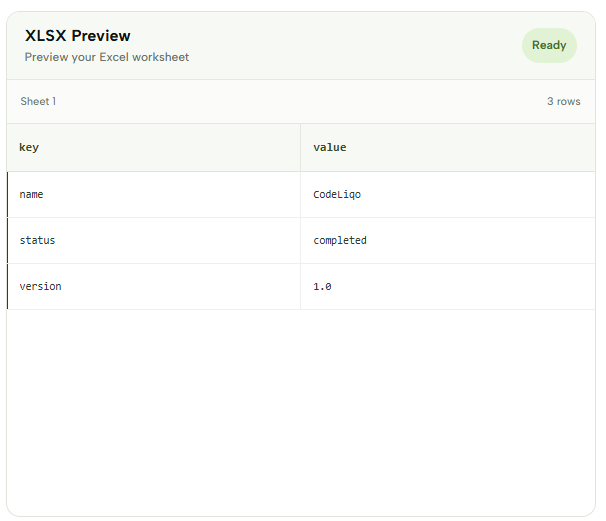
is converted into spreadsheet data with the JSON properties displayed as keys and their corresponding values:
| key | value |
|---|---|
| name | CodeLiqo |
| status | completed |
| version | 1.0 |
Check the example image below to see how the JSON data is converted into an XLSX spreadsheet. ↓
Once the conversion is complete, you can download the generated .xlsx file and open it with Microsoft Excel or another compatible spreadsheet application. JSON to XLSX is useful when you need to organize JSON data in a spreadsheet for further editing, analysis or processing.
More JSON Tools
Need to work with JSON in other ways? Explore our other JSON tools to format, validate, view, convert and analyze your data.

JSON Compare
Compare two JSON files and find differences instantly.

JSON Viewer
View and explore JSON data in a clear, structured format.

JSON Validator
Validate JSON syntax and find errors instantly.

JSON Formatter
Format and beautify JSON for easier reading and editing.

JSON to CSV
Convert JSON data into a structured CSV format.
JSON to XML
Convert JSON data into a structured XML format.
JSON to SQL
Convert JSON data into SQL statements for databases.

JSON to YAML
Convert JSON data into clean and readable YAML.

JSON to TSV
Convert JSON data into a structured TSV format.