JSON Compare
Compare two JSON documents and quickly identify what has changed. Our free online JSON Compare tool highlights added, removed, and modified properties in a clear and easy-to-understand format.
No Changes Found
The two JSON documents are identical.
EVERYTHING YOU NEED TO KNOW
How to use the JSON Compare Tool?
A JSON Compare tool compares two JSON documents and identifies the differences between them. It helps you quickly see which properties have been added, removed, or modified.
Simply paste or enter the two JSON documents into the comparison fields and start the comparison. The tool analyzes both structures and highlights the differences between them.
JSON Compare can identify added, removed, and modified properties and values. It can also compare nested objects and arrays to help you understand changes throughout the JSON structure.
Comparing JSON is useful when checking API responses, reviewing configuration changes, debugging applications, or verifying that data has changed as expected.
No. CodeLiqo’s JSON Compare tool processes your input directly in your browser. Your JSON does not need to be uploaded to a remote server for comparison, helping keep your data on your device.
What Does JSON Compare Do?
JSON Compare lets you compare two JSON documents and quickly find the differences between them. You can add the original and updated JSON by pasting the text directly into the input fields or by selecting .json files from your device. You can also combine both methods, such as pasting one JSON document and loading the other from a file.
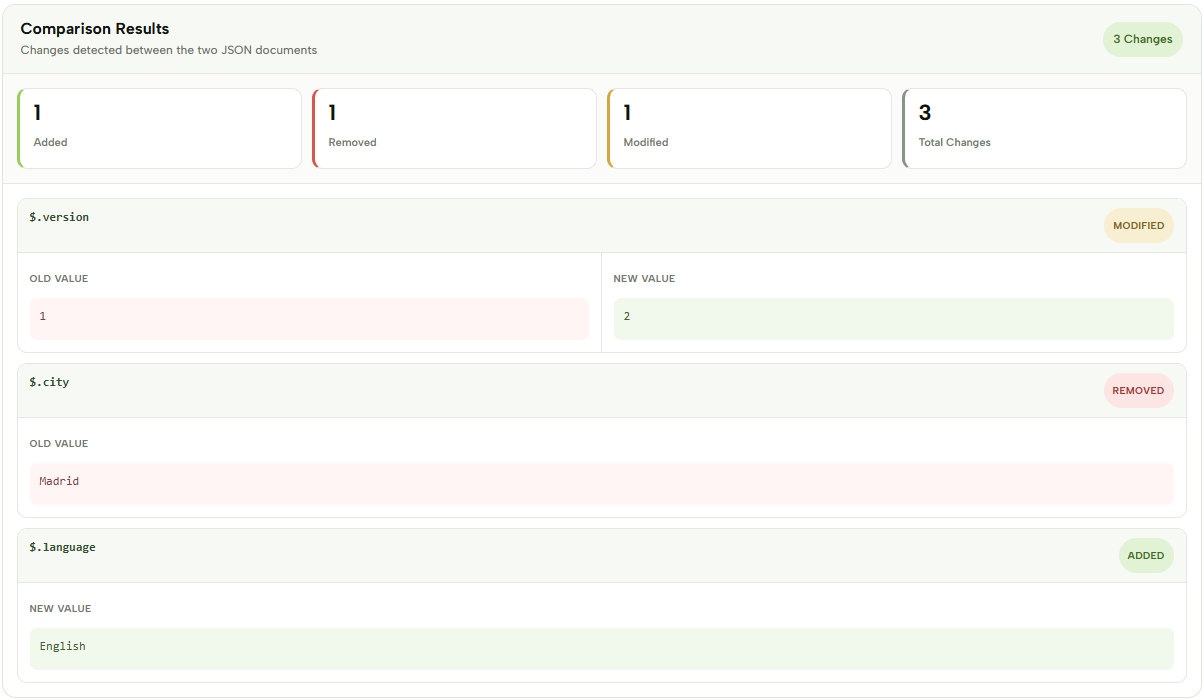
After adding both documents, click Compare JSON to start the comparison. The tool opens a Comparison Results section showing the number of added, removed and modified values, together with the total number of changes.
For example, you can compare:
Original JSON
{
  "name": "CodeLiqo",
  "version": 1,
  "city": "Madrid"
}
Updated JSON
{
  "name": "CodeLiqo",
  "version": 2,
  "language": "English"
}
In this example, version has been modified, city has been removed and language has been added. The comparison results make these changes easy to identify without manually checking both documents.
Check the example image below to see how the comparison results are displayed. ↓
JSON Compare is useful for comparing API responses, configuration files, application data and different versions of JSON files. The results also show the JSON path and the relevant values for each detected change, which makes it easier to locate differences inside larger documents.
If both documents are identical, the tool indicates that no changes were found. JSON Compare processes your data locally in your browser, so your JSON is not uploaded to a server.
More JSON Tools
Need to work with JSON in other ways? Explore our other JSON tools to format, validate, view, convert and analyze your data.

JSON Viewer
View and explore JSON data in a clear, structured format.

JSON Validator
Validate JSON syntax and find errors instantly.

JSON Formatter
Format and beautify JSON for easier reading and editing.
JSON to CSV
Convert JSON data into a structured CSV format.
JSON to XML
Convert JSON data into a structured XML format.
JSON to XLSX
Convert JSON data into an Excel spreadsheet instantly.
JSON to SQL
Convert JSON data into SQL statements for databases.

JSON to YAML
Convert JSON data into clean and readable YAML.

JSON to TSV
Convert JSON data into a structured TSV format.