JWT Encoder
Encode JWT components quickly and easily with our free online JWT Encoder. Create properly encoded JWT headers and payloads for development, testing, and API workflows.
EVERYTHING YOU NEED TO KNOW
How to use the JWT Encoder?
A JWT Encoder converts a JSON header and payload into the encoded format used by JSON Web Tokens. It helps developers prepare JWT components for testing and development.
Simply enter your JSON header and payload into the encoder and start the encoding process. The tool converts the provided data into the corresponding Base64URL-encoded format.
JWTs use Base64URL encoding to represent their header and payload in a compact format. Encoding JSON data allows it to be represented as part of the standard JWT structure.
No. Encoding only converts the header and payload into the required representation. A valid signed JWT also requires a cryptographic signature created using an appropriate signing algorithm and key.
No. CodeLiqo’s JWT Encoder processes your input directly in your browser. Your data does not need to be uploaded to a remote server for encoding, helping keep your information on your device.
What Does JWT Encoder Do?
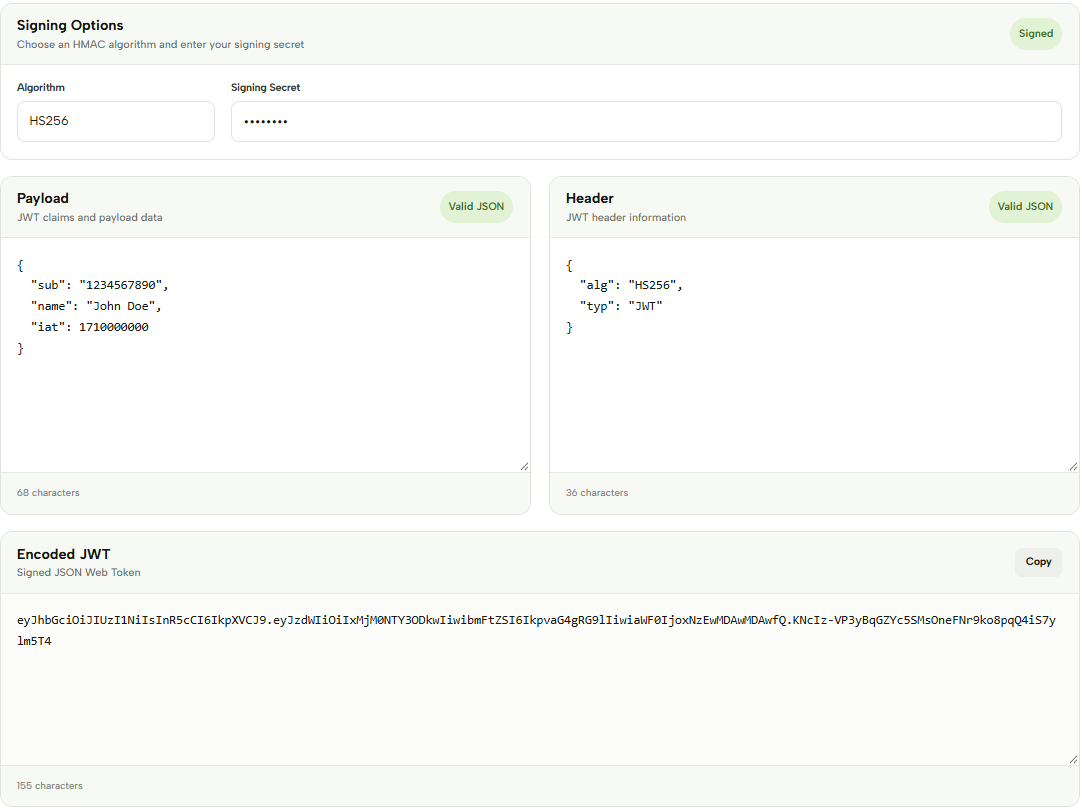
JWT Encoder lets you create a signed JSON Web Token by combining a JWT Header, Payload and signing secret. Choose one of the available HMAC algorithms — HS256, HS384 or HS512 — and enter the secret that will be used to sign the token.
Add your Payload with the claims and data you want to include in the token, then enter the Header containing the JWT configuration. The Header and Payload are provided as JSON data and are combined with the selected signing algorithm and secret.
Once the required information has been entered, the tool generates the Encoded JWT in the output section. The resulting token can then be copied and used in development or testing workflows.
For example, you can create a Payload such as:
{
  "sub": "1234567890",
  "name": "John Doe",
  "iat": 1710000000
}
And a Header such as:
{
  "alg": "HS256",
  "typ": "JWT"
}
Select HS256, enter your signing secret, and generate the token. The resulting value is a compact JWT containing the encoded Header and Payload together with their cryptographic signature.
Check the example image below to see how JWT Encoder generates the encoded token. ↓
The three available HMAC algorithms use different hash functions to create the signature: HS256, HS384 and HS512. The algorithm selected in the Signing Options determines how the provided secret is used to sign the JWT.
JWT Encoder is useful for development, testing and learning how signed JSON Web Tokens are created. The generated token can then be inspected with JWT Inspector or decoded with JWT Decoder to examine its Header and Payload.
Keep your signing secret private and avoid entering production secrets or other sensitive credentials into tools unless you understand how the data is handled. JWT Encoder processes the token generation directly in your browser.
More JWT Tools
Need to work with JWTs in other ways? Explore our other JWT tools to decode, encode, generate, validate and debug tokens.