CRON Expression Tester
Test CRON expressions quickly and easily with our free online CRON Expression Tester. Check when a scheduled task will run and verify your expressions before using them in production.
*
*
*
*
*
EVERYTHING YOU NEED TO KNOW
How to use the CRON Expression Tester?
A CRON Expression Tester helps you check how a CRON expression behaves by showing the scheduled times generated by the expression. It makes it easier to verify that a schedule works as expected.
Simply enter your CRON expression into the tester and run the test. The tool analyzes the expression and displays the upcoming execution times based on the defined schedule.
Testing a CRON expression before using it can help identify scheduling mistakes. It allows you to confirm that a task will run at the intended times.
Yes. The tester can evaluate CRON expressions containing common scheduling features such as specific values, ranges, lists, intervals, and wildcards.
No. CodeLiqo’s CRON Expression Tester processes your input directly in your browser. Your CRON expression does not need to be uploaded to a remote server for testing.
What Does CRON Expression Tester Do?
CRON Expression Tester lets you check whether a specific date and time matches a CRON expression and see when the task will run next. Enter a CRON expression and choose a date and time to test the schedule.
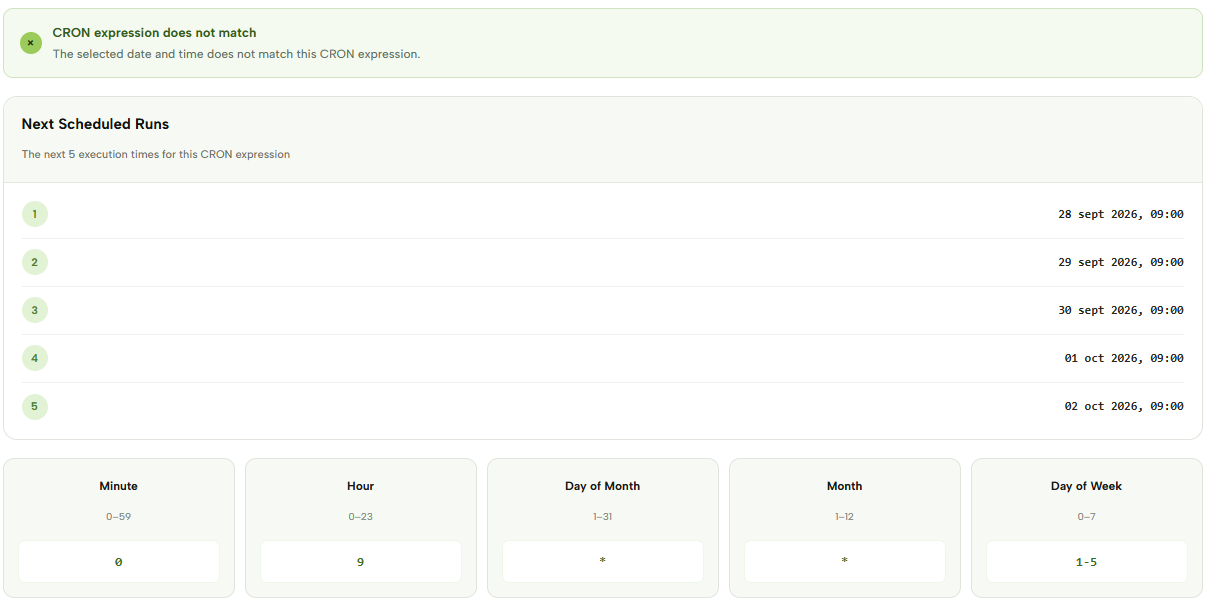
For example, you can use the following CRON expression: 0 9 * * 1-5
Then choose September 28, 2026 at 08:30 as the date and time to check. This expression represents a schedule that runs at 09:00 from Monday through Friday.
The selected date and time matches the schedule if it falls on one of the defined execution times. After testing the expression, the tool also displays the next 5 scheduled runs, making it easy to see exactly when the task will execute.
Check the example image below to see how CRON Expression Tester displays the next scheduled runs. ↓
With the example above, the next five executions would be:
- September 28, 2026 at 09:00
- September 29, 2026 at 09:00
- September 30, 2026 at 09:00
- October 1, 2026 at 09:00
- October 2, 2026 at 09:00
The tester is useful when you want to verify not only whether a CRON expression is valid, but also whether it actually runs at the dates and times you expect. This can be particularly helpful for recurring jobs that use specific weekdays, hours or other scheduling conditions.
If the selected date and time matches the expression, the tool confirms that the CRON expression matches. If it does not match, the result indicates that the selected time does not correspond to the specified schedule.
CRON Expression Tester can be useful for checking server jobs, scripts, automated tasks and application schedules before putting them into production. Seeing the next five executions also provides a quick way to spot scheduling mistakes that may not be obvious from the CRON expression itself.
More CRON Tools
Need to work with CRON expressions in other ways? Explore our other CRON tools to explain, generate, test and convert CRON schedules.