Convert XML to CSV quickly and easily with our free online XML to CSV Converter. Transform structured XML data into a tabular CSV format directly in your browser with no installation required.
XML InputPaste your XML below
Ready
CSV OutputConverted CSV data
Waiting
↥
Convert an XML file
Select or drag & drop a .xml file to convert it to CSV
No file selected
!
✓
Your data is processed locally in your browser. Nothing is uploaded to a server.
Paste or enter your JSON data into the converter and run the conversion. The tool processes the JSON structure and generates the corresponding CSV output.
Paste or enter your JSON data into the converter and run the conversion. The tool processes the JSON structure and generates the corresponding CSV output.
CSV files are commonly used for spreadsheets, data analysis, database imports, reporting, and transferring structured data between different applications.
No. CodeLiqo’s JSON to CSV Converter processes your JSON data directly in your browser. Your data does not need to be uploaded to a remote server, helping keep your information on your device.
What Does XML to CSV Do?
XML to CSV allows you to convert XML data into a CSV file that can be opened and processed as a spreadsheet or imported into other applications. You can paste XML directly into the tool or select an XML file from your device.
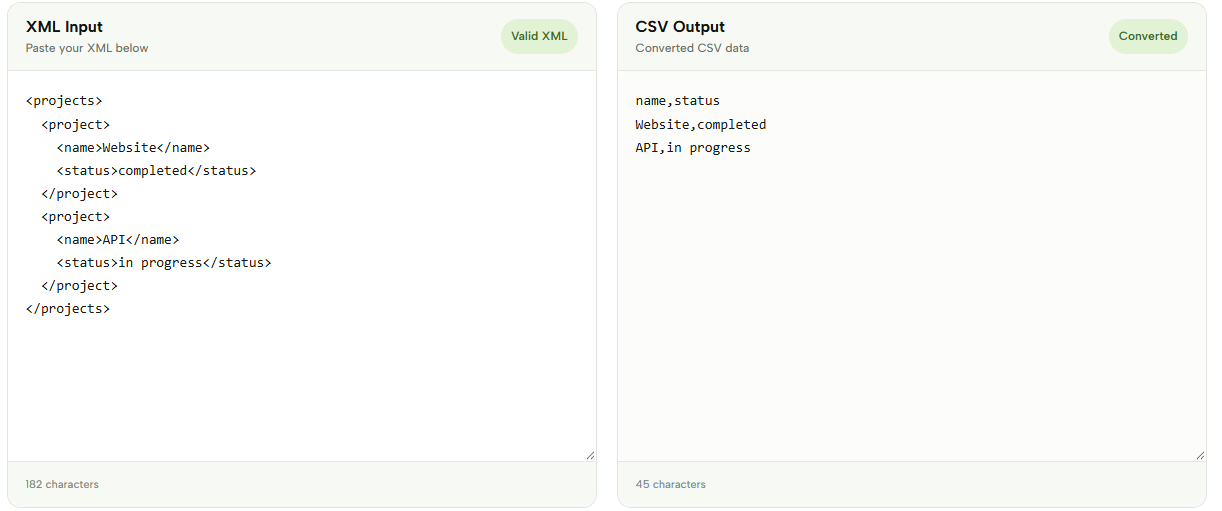
Add your XML and click Convert to CSV to transform the structured XML data into rows and columns. The tool extracts the relevant elements and organizes them into a CSV format that is easier to work with in spreadsheet applications and data-processing tools.
Check the example image below to see how XML data is converted into CSV rows and columns. ↓
XML to CSV is useful when you need to move XML data into spreadsheet applications, analyze structured information, create reports, or process data with tools that work with CSV files. Converting the data into rows and columns can make it easier to filter, sort, and work with larger datasets.
The converted CSV can be copied or downloaded as a file for use in other applications. Everything is processed directly in your browser, making it convenient for quick XML to CSV conversions without installing additional software.
More XML Tools
If you work with XML regularly, CodeLiqo also provides other XML tools for viewing, validating, formatting, testing and converting XML documents: