Base64 Encoder
Encode text and data to Base64 quickly and easily with our free online Base64 Encoder. Convert your input into Base64 format directly in your browser with no installation required.
EVERYTHING YOU NEED TO KNOW
How to use the Base64 Encoder?
A Base64 Encoder converts text or binary data into a Base64-encoded string. It represents data using a set of 64 characters, making it suitable for use in text-based formats and data transmission.
Simply enter or paste your text into the encoder and start the encoding process. The tool converts your input into a Base64 string that you can copy and use wherever needed.
Base64 encoding is commonly used to represent binary data as text. It is frequently used for data URLs, API data, email attachments, authentication headers, and other applications that require text-based data.
No. Base64 is an encoding method, not an encryption method. Base64-encoded data can be easily decoded, so it should not be used to protect passwords, private keys, or other sensitive information.
No. CodeLiqo’s Base64 Encoder processes your input directly in your browser. Your data does not need to be uploaded to a remote server for encoding, helping keep your information on your device.
What Does Base64 Encoder Do?
Base64 Encoder lets you convert regular text into a Base64-encoded value directly in your browser. Simply enter your text in the input field and the tool converts it into its Base64 representation in the output.
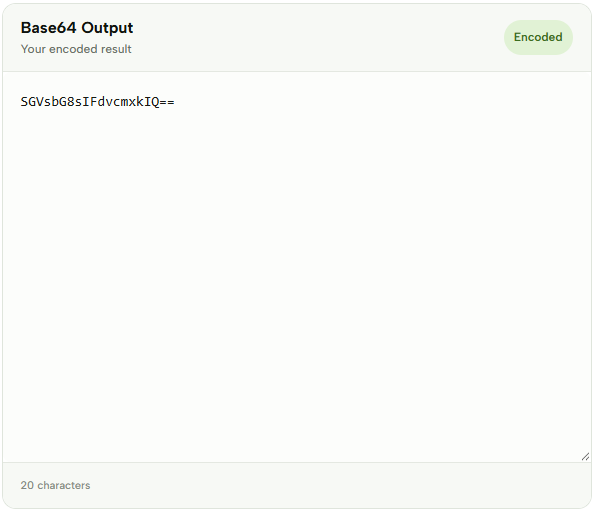
For example, you can enter: Hello, World!
The encoded output will be: SGVsbG8sIFdvcmxkIQ==
Check the example image below to see how Base64 Encoder converts text into Base64. ↓
Base64 encoding is commonly used when text or other data needs to be represented using a text-based format. It can be useful when working with APIs, web applications, configuration files, data transfer and other development tasks where encoded data needs to be included in a text-based format.
Base64 uses a set of characters that includes uppercase and lowercase letters, numbers and some special characters. Depending on the input length, the encoded value can also end with one or two = characters used as padding.
Encoding text as Base64 does not encrypt or protect the original information. Base64 is an encoding method, which means that the resulting value can be decoded back into its original representation. For this reason, Base64 should not be used as a way to hide passwords, private keys or other sensitive information.
Base64 Encoder can be useful when you need to quickly convert a text value into Base64 without writing your own encoding function. For example, you might need a Base64 string for an API request, test data, a configuration value or a development workflow.
The encoded result appears in the Encoded Output section after processing the input. This makes it easy to inspect, copy and use the resulting Base64 value wherever it is needed.
The tool works directly in your browser, so there is no software or additional installation required. Simply enter your text, encode it and copy the resulting Base64 value.
You can also use Base64 Decoder to perform the reverse operation. If you have a Base64 value and want to recover the original text, paste it into the decoder to obtain its decoded representation.
Base64 Encoder is designed for quick and straightforward text encoding, making it useful for developers who need to convert text to Base64 during development, testing or data processing.
More Base64 Tools
Need to work with Base64 in other ways? Explore our other Base64 tools to encode and decode text and images.