Convert images to Base64 quickly and easily with our free online Base64 Image Encoder. Encode image files into Base64 strings directly in your browser with no installation required.
Image Input
Select or drag & drop an image to encode
Ready
↥
Drop your image here
or choose an image from your device
No file selected
Base64 Output
Encoded image data
Waiting
!
✓
Your image is processed locally in your browser. Nothing is uploaded to a server.
A Base64 Image Encoder converts an image file into a Base64-encoded string. This allows the image data to be represented as text and used in applications that support Base64 data.
Simply upload your image to the encoder and start the encoding process. The tool converts the image into a Base64 string that you can copy and use in your project.
Common image formats such as PNG, JPEG, GIF, WebP, and SVG can be represented using Base64. The supported formats depend on the image type and browser capabilities.
No. CodeLiqo’s Base64 Image Encoder processes your image directly in your browser. Your image does not need to be uploaded to a remote server for encoding, helping keep your files on your device.
What Does Base64 Image Encoder Do?
Base64 Image Encoder lets you convert an image into a Base64-encoded representation directly in your browser. Select an image from your desktop or device, and the tool converts the image data into Base64.
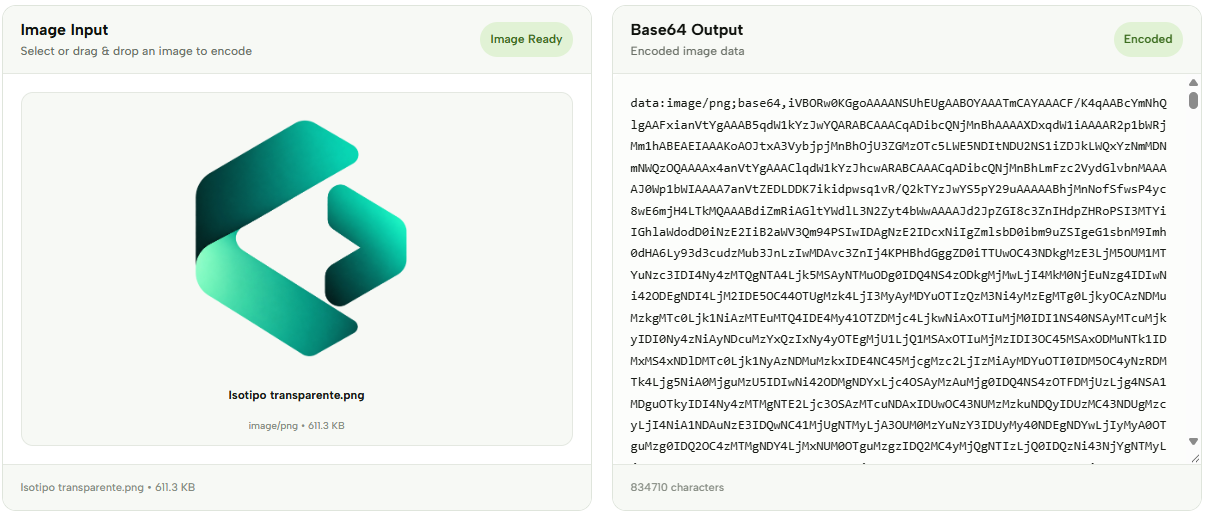
Once the image has been selected, the tool processes it and displays the resulting Base64 data in the output. This allows you to obtain a text-based representation of the image without manually writing any encoding code.
Check the example image below to see how an image is selected and converted into Base64. ↓
The resulting Base64 data can be useful in web development when an image needs to be represented as text. For example, Base64 image data can be used in HTML, CSS, data URLs and applications that require image information to be embedded directly into a text-based resource.
The encoded result contains the image data together with information about its media type. This allows the resulting value to identify formats such as PNG or JPEG when it is used as a data URL.
Base64 encoding does not compress or encrypt an image. It simply represents the original binary image data using a text-based encoding format. The resulting Base64 value can therefore be decoded back into the original image using a Base64 Image Decoder.
Base64 can be convenient for small images, icons, previews and development purposes, although encoding an image as Base64 increases the amount of data compared with the original binary file. For larger images, using a normal image file is often more efficient.
The conversion is performed directly in your browser, so you can select an image from your desktop and convert it without installing additional software. The generated Base64 result can then be copied and used wherever Base64 image data is required.
Base64 Image Encoder is useful for developers working with HTML, CSS, APIs, web applications and data URLs who need a quick way to convert an image into a Base64 representation.
More Base64 Tools
Need to work with Base64 in other ways? Explore our other Base64 tools to encode and decode text and images.