JSON Formatter
Format and beautify JSON instantly. Validate, format, minify and copy your JSON directly in your browser
EVERYTHING YOU NEED TO KNOW
How to use the JSON Formatter?
A JSON Formatter organizes JSON data into a clear and readable structure. It adds proper indentation and line breaks, making complex or minified JSON easier to read, understand, and work with.
Simply paste or type your JSON into the formatter and run the formatting process. The tool automatically organizes the data with proper indentation and line breaks, making the structure easier to understand.
Formatting JSON makes structured data much easier to read and review. It can help you quickly understand complex objects, identify nested elements, and work more efficiently with JSON used in applications and APIs.
Yes. A JSON Formatter can turn minified JSON into a properly indented and readable format. This is especially useful when working with API responses or other JSON data that has been compressed into a single line.
No. CodeLiqo’s JSON Formatter processes your input directly in your browser. Your JSON does not need to be uploaded to a remote server for formatting, allowing you to work with your data while keeping the content on your device.
What Does JSON Formatter Do?
JSON Formatter lets you format and organize JSON data into a clear and readable structure. You can add your JSON by pasting the text directly into the input field or by selecting a .json file from your device.
After adding the JSON, click Format JSON to generate the formatted result. The output is automatically organized with indentation and line breaks, making nested objects and arrays much easier to read and inspect.
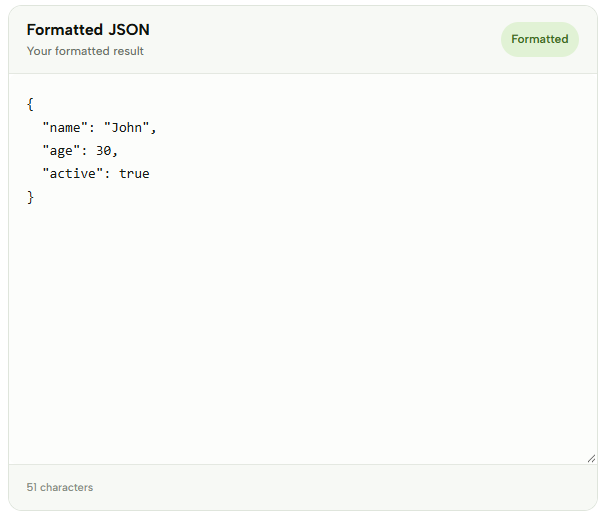
For example, a compact JSON document can be transformed into a structured format that is easier to understand and work with:
Input
{"name":"John","age":30,"active":true}Formatted JSON
{
  "name": "John",
  "age": 30,
  "active": true
}
Check the example image below to see how JSON Formatter displays the formatted result. ↓
In addition to formatting, you can use Minify to reduce the JSON to a more compact format by removing unnecessary whitespace and line breaks. The formatted result can also be copied or downloaded as a .json file, making it easy to use the output in another application or save it for later.
JSON Formatter is useful when working with API responses, configuration files and other JSON data that is difficult to read because of its formatting. You can quickly turn a compact or poorly formatted document into a structured JSON file directly in your browser.
More JSON Tools
Need to work with JSON in other ways? Explore our other JSON tools to format, validate, view, convert and analyze your data.

JSON Compare
Compare two JSON files and find differences instantly.

JSON Viewer
View and explore JSON data in a clear, structured format.

JSON Validator
Validate JSON syntax and find errors instantly.

JSON to CSV
Convert JSON data into a structured CSV format.
JSON to XML
Convert JSON data into a structured XML format.

JSON to XLSX
Convert JSON data into an Excel spreadsheet instantly.

JSON to SQL
Convert JSON data into SQL statements for databases.

JSON to YAML
Convert JSON data into clean and readable YAML.

JSON to TSV
Convert JSON data into a structured TSV format.