JWT Validator
Validate JSON Web Tokens quickly and easily with our free online JWT Validator. Check JWT structure, claims, expiration, and signature validity for development and testing.
EVERYTHING YOU NEED TO KNOW
How to use the JWT Validator?
A JWT Validator checks whether a JSON Web Token is correctly structured and meets the required validation criteria. It can help identify invalid tokens, expired claims, or signature-related issues.
Simply enter your JWT into the validator and provide the required information for verification. The tool analyzes the token and reports whether it passes the available validation checks.
Depending on the validation options, a JWT Validator can check the token structure, required claims, expiration time, and cryptographic signature. These checks help determine whether a token can be accepted by an application.
An expired JWT can still be inspected, but it should not pass expiration validation. The exp claim determines when a token is no longer considered valid.
No. CodeLiqo’s JWT Validator processes your input directly in your browser. Your JWT and other provided data do not need to be uploaded to a remote server for validation.
What Does JWT Validator Do?
JWT Validator lets you check a JSON Web Token by providing the token and the signing secret used to verify its signature. Start by entering the JWT Token, then select the signing algorithm and enter the Signing Secret.
For example, you can validate this JWT:
eyJhbGciOiJIUzI1NiIsInR5cCI6IkpXVCJ9.eyJzdWIiOiJ1c2VyLTAwMSIsImlzcyI6ImNvZGVsaXFvLmNvbSIsImF1ZCI6ImRldmVsb3BlcnMtYXBpIiwibmFtZSI6IkFsaWNlIEpvaG5zb24iLCJyb2xlIjoiZGV2ZWxvcGVyIiwiaWF0IjoxNzg5NTkzMDAzLCJuYmYiOjE3ODk1OTMyNDMsImV4cCI6MTc4OTU5NjkwMywianRpIjoiZGVidWctdGVzdC0wMDEifQ.xDc3rPJoD_6MF64MW8ijdIyQWg2NtbqUhSm2OhSRFZgSelect HS256 as the algorithm and enter the signing secret used to create the token. The validator then processes the token using these values to check its signature.
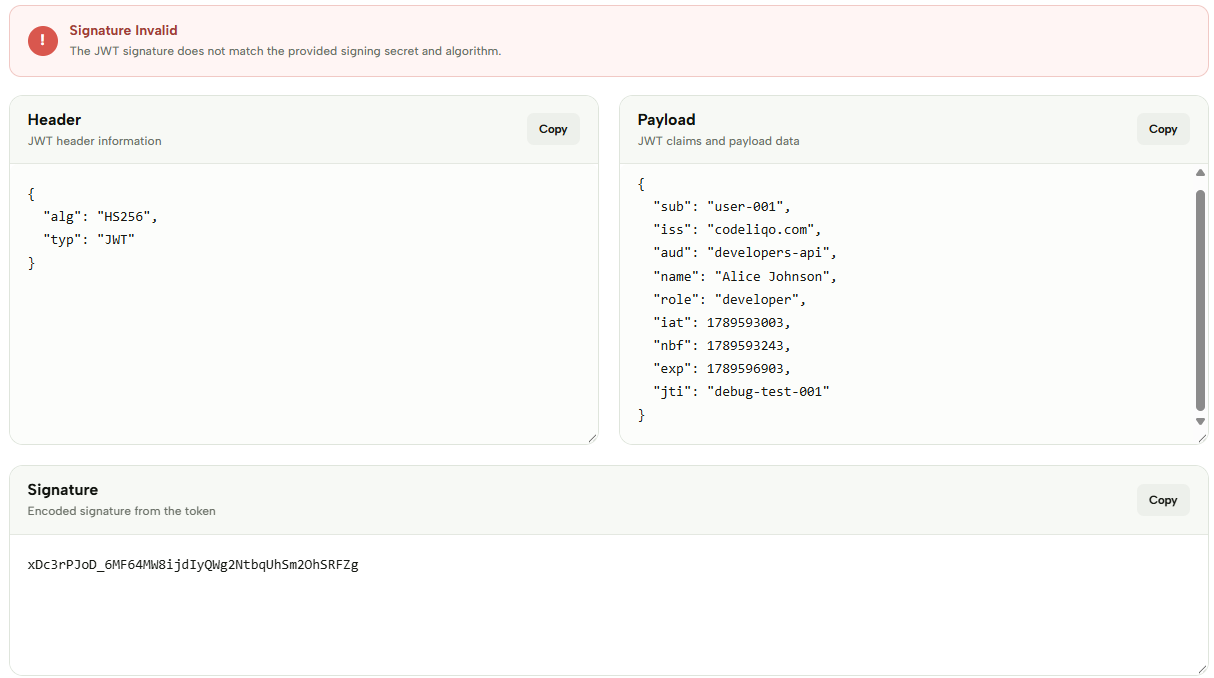
After validation, the tool displays the main components of the token in separate sections: Header, Payload and Signature. The Header contains information such as the selected algorithm and token type, while the Payload contains the claims and data stored in the JWT. The Signature displays the encoded signature from the token.
Check the example image below to see how JWT Validator receives the token and validation options. ↓
JWT Validator is useful when testing authentication tokens or checking JWTs during development. It can help you inspect the structure of a token while using the signing secret and selected algorithm to validate its signature.
The Header and Payload make it easier to inspect the information contained in the token, while the Signature provides the data used when checking whether the token matches the supplied signing secret and algorithm.
More JWT Tools
Need to work with JWTs in other ways? Explore our other JWT tools to decode, encode, generate, validate and debug tokens.