CRON Expression Generator
Create CRON expressions quickly and easily with our free online CRON Expression Generator. Build custom schedules for recurring tasks without having to write complex CRON syntax manually.
Build Your CRON Expression
Select values for each field to generate a standard five-field CRON expression.
Generated CRON Expression
Use the generated expression in your CRON job or scheduler.
Quick Examples
Select a common schedule to automatically configure the generator.
EVERYTHING YOU NEED TO KNOW
How to use the CRON Expression Generator?
A CRON Expression Generator creates CRON expressions based on a schedule you define. It provides an easy way to create recurring task schedules without manually writing the required syntax.
Select when you want your task to run, such as a specific minute, hour, day, or interval. The generator uses your selections to create the corresponding CRON expression.
CRON syntax can be difficult to write correctly, especially for more complex schedules. A generator simplifies the process and helps reduce common syntax errors.
Yes. Depending on the available options, you can create schedules using specific times, recurring intervals, ranges, and other common CRON scheduling patterns.
No. CodeLiqo’s CRON Expression Generator processes your input directly in your browser. Your scheduling information does not need to be uploaded to a remote server to generate a CRON expression.
What Does CRON Expression Generator Do?
CRON Expression Generator lets you create a CRON expression by selecting the schedule you want instead of writing the CRON syntax manually. Choose the values for each of the five fields: minute, hour, day of month, month and weekday.
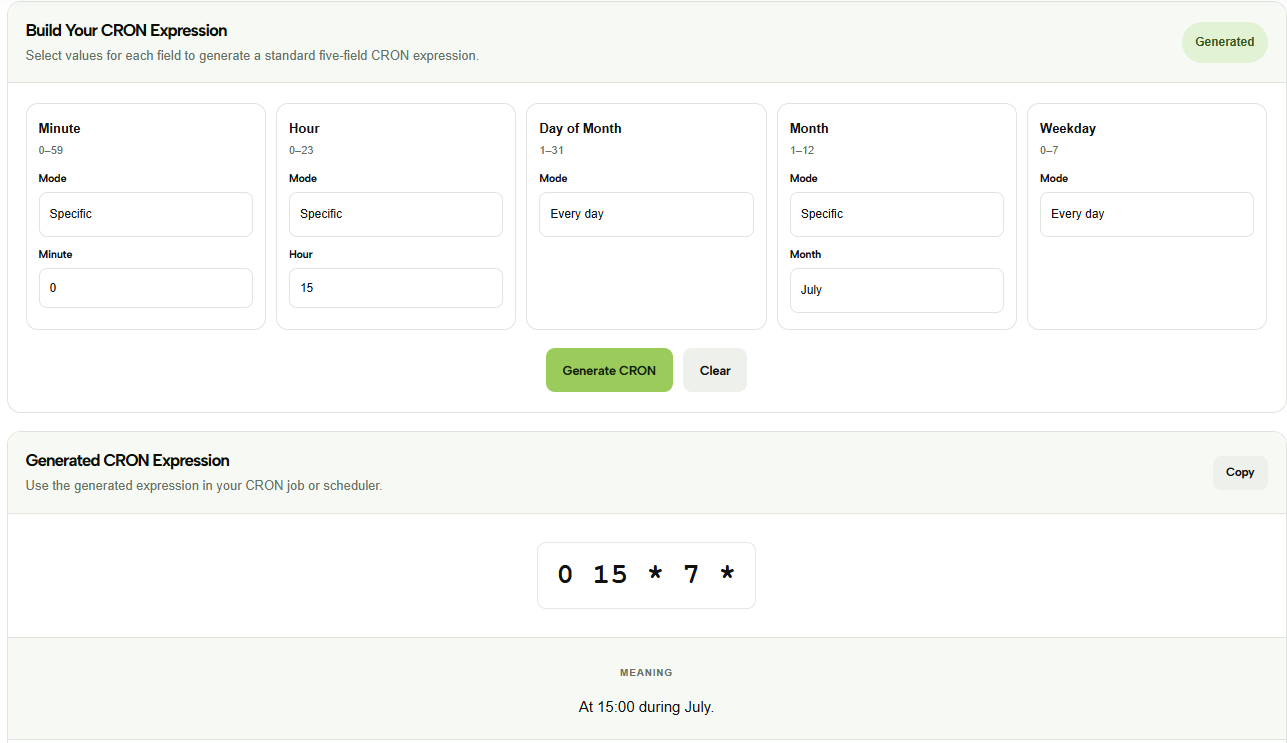
For example, you can select minute 0, hour 15, every day of the month, July and every weekday. The tool then generates the corresponding CRON expression: 0 15 * 7 *
Check the example image below to see how the selected values are converted into a CRON expression. ↓
Each field can be configured independently, allowing you to create simple or more specific schedules. You can select particular values or use options such as every day, every month or every weekday depending on the schedule you need.
After choosing the desired values, click Generate CRON. The generated expression is displayed in a separate section together with its meaning, so you can check the resulting schedule before using it.
The generated expression can also be copied directly from the output, making it easy to use in a CRON job, server scheduler or automated process.
CRON Expression Generator is useful if you know when you want a task to run but are not familiar with CRON syntax. Instead of remembering the order and format of all five fields, you can select the schedule visually and let the tool generate the expression for you.
This can be especially helpful when creating recurring schedules where several fields need to be combined. The generated expression can then be checked with CRON Expression Validator or explained with CRON Expression Explainer before using it.
More CRON Tools
Need to work with CRON expressions in other ways? Explore our other CRON tools to explain, generate, test and convert CRON schedules.