CRON Timezone Converter
Convert CRON schedules between time zones with our free online CRON Timezone Converter. Check when scheduled tasks will run in different locations and avoid timezone-related scheduling errors.
| # | Source Timezone | Target Timezone |
|---|
*
*
*
*
*
EVERYTHING YOU NEED TO KNOW
How to use the CRON Timezone Converter?
A CRON Timezone Converter helps you determine when a CRON schedule will run in different time zones. It makes it easier to manage scheduled tasks across different locations.
Enter your CRON expression, select the source timezone, and choose the target timezone. The converter calculates the corresponding execution times for the selected location.
CRON schedules can run at different local times depending on the timezone used by the system. Considering time zones is especially important when managing servers, applications, or teams across different regions.
Yes. Daylight saving time can change the local time at which a scheduled task runs. Using the correct timezone helps account for these changes when determining execution times.
No. CodeLiqo’s CRON Timezone Converter processes your input directly in your browser. Your CRON expression does not need to be uploaded to a remote server for timezone conversion.
What Does JSON Compare Do?
CRON Timezone Converter lets you see when a CRON schedule will run in another timezone. Select the Source Timezone where the original CRON schedule is defined, choose the Target Timezone you want to convert it to, and enter the CRON expression.
You can also choose a Start From date and time to determine when the tool should begin calculating the upcoming executions.
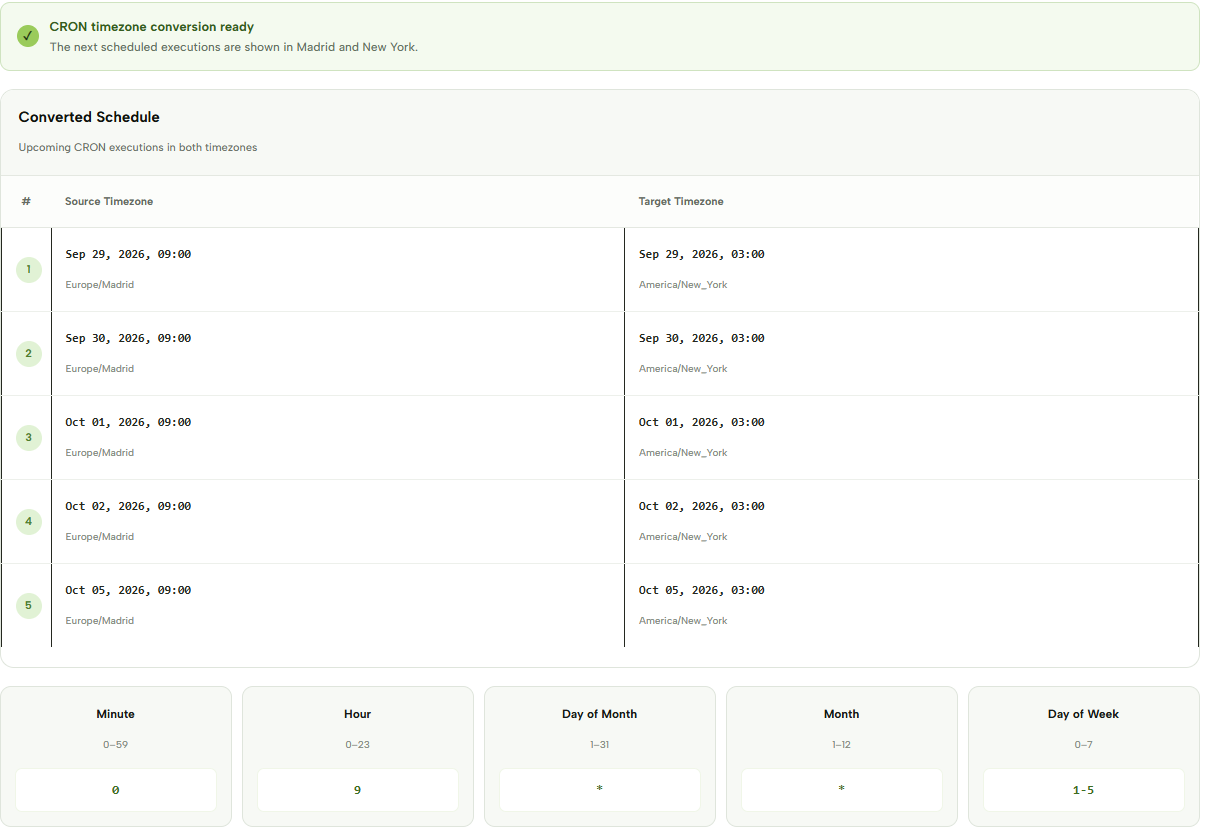
For example, you can use: CRON: 0 9 * * 1-5
Select Europe/Madrid as the Source Timezone and America/New_York as the Target Timezone. Set the start date and time to begin calculating the schedule.
Check the example image below to see how CRON Timezone Converter displays the upcoming executions in both timezones. ↓
The tool shows the upcoming CRON executions in a table, with the date and time displayed separately for the Source Timezone and Target Timezone. This makes it easy to see exactly when the same scheduled task will run after the timezone conversion.
The converter calculates multiple upcoming executions, so you can compare the schedule across several days rather than checking only a single time. This is particularly useful for CRON jobs that run on weekdays or other recurring schedules.
Timezone conversion is important when a scheduled task needs to run at a specific local time but the server or application operates in another timezone. A CRON expression itself does not contain timezone information, so the same expression can correspond to different local times depending on where it is executed.
CRON Timezone Converter is useful for developers, system administrators and anyone working with scheduled tasks across different countries or regions. It can help prevent scheduling mistakes when a CRON job needs to coordinate with users, services or systems operating in another timezone.
More CRON Tools
Need to work with CRON expressions in other ways? Explore our other CRON tools to explain, generate, test and convert CRON schedules.