XML Validator
Validate XML documents quickly and easily with our free online XML Validator. Check XML syntax and structure for errors directly in your browser with no installation required.
EVERYTHING YOU NEED TO KNOW
How to use the XML Validator?
An XML Validator checks whether an XML document follows the correct syntax and structure. It helps identify errors in elements, attributes, tags, and other parts of the XML document.
Simply paste or enter your XML into the validator and run the validation. The tool analyzes your document and checks whether it follows the required XML syntax rules.
Common XML errors include unclosed tags, mismatched elements, missing quotation marks, invalid characters, duplicate attributes, and incorrect nesting. Even a small syntax error can make an XML document invalid.
If your XML contains a syntax error, the validator identifies the document as invalid and provides information about the problem. Correct the indicated issue and validate your XML again until it passes the validation.
No. CodeLiqo’s XML Validator processes your input directly in your browser. Your XML does not need to be uploaded to a remote server for validation, helping keep your data on your device.
What Does XML Validator Do?
XML Validator allows you to check whether an XML document is correctly structured and follows the basic syntax rules required for valid XML. You can paste XML directly into the tool or select an XML file from your device.
To validate a document, add your XML and click Validate XML. If the document is valid, the tool confirms that the XML is correctly structured. If there is an error, the validation result identifies the problem so you can find and correct the invalid part of the document.
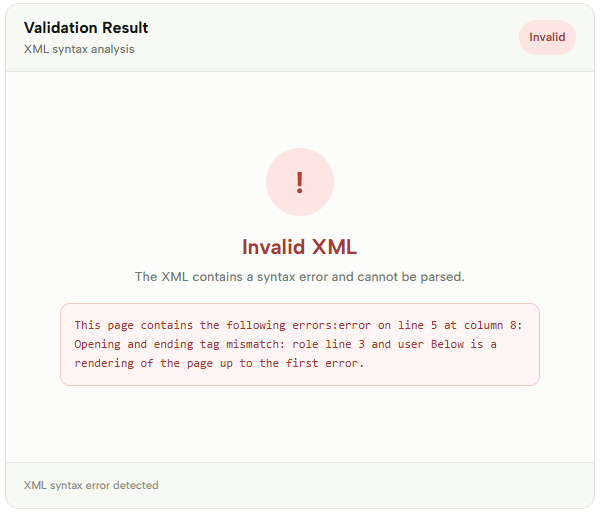
For example, this XML contains a syntax error:
<user>
  <name>CodeLiqo</name>
  <role>developer<role>
  <active>true</active>
</user>
The problem is the role element. It starts with <role> but does not have the corresponding closing tag </role>. XML elements must be properly opened and closed, so this prevents the document from being valid.
Check the example image below to see how XML Validator displays a specific XML syntax error. ↓
XML Validator is useful when working with API responses, configuration files, data exports, integrations, or XML documents that need to be checked before being processed by another application. Validating XML before using it can help identify syntax problems early and make troubleshooting easier.
The tool works directly in your browser, so you can quickly check XML without installing additional software. It is also useful during development when creating or modifying XML and you want to verify that the document remains correctly structured.
More XML Tools
If you work with XML regularly, CodeLiqo also provides other XML tools for viewing, validating, formatting, testing and converting XML documents:

XML Compare
Compare two XML files and find differences instantly.

XML Viewer
View and explore XML data in a clear, structured format.

XML Formatter
Format and beautify XML for easier reading and editing.

Xpath Tester
Test XPath expressions against XML documents quickly.
XML to CSV
Convert XML data into a structured CSV format.

XML to JSON
Convert XML data into a structured JSON format.
XML to PDF
Convert XML data into a PDF document instantly.
XML to TXT
Convert XML data into clean and readable plain text.
XML to HTML
Convert XML data into structured HTML content.
XML to XLSX
Convert XML data into an Excel spreadsheet instantly.
XML to TSV
Convert XML data into a structured TSV format.
XML to YAML
Convert XML data into clean and readable YAML.