XML Viewer
View XML data quickly and easily with our free online XML Viewer. Explore XML documents in a clear and structured format directly in your browser with no installation required.
—
—
—
XML Viewer
Enter valid XML above to explore its structure.
EVERYTHING YOU NEED TO KNOW
How to use the XML Viewer?
An XML Viewer displays XML documents in a clear and structured format. It makes elements, attributes, and nested data easier to read, navigate, and understand.
Simply paste or enter your XML into the viewer and start the process. The tool organizes the document into a readable structure, making it easier to explore its contents.
An XML Viewer makes complex or deeply nested XML documents easier to inspect. It is especially useful when working with configuration files, API responses, or large XML documents.
Yes. An XML Viewer can help you navigate large XML structures by presenting elements and nested data in an organized format. Performance may vary depending on the size of the document and your browser.
No. CodeLiqo’s XML Viewer processes your input directly in your browser. Your XML does not need to be uploaded to a remote server for viewing, helping keep your data on your device.
What Does XML Viewer Do?
XML Viewer allows you to open and explore XML documents in a clear, structured format. You can paste XML directly into the tool or select an XML file from your device, making it easy to inspect the contents of a document without manually reading through the raw XML code.
Once the XML is loaded, the viewer displays its structure as an interactive tree. Elements, attributes, values, and nested sections can be expanded or collapsed, allowing you to navigate through complex XML documents more easily. This is especially useful when working with XML files that contain many levels of nested data.
For example, you can load an XML document such as:
<user>
  <name>CodeLiqo</name>
  <role>developer</role>
  <address>
    <city>Madrid</city>
    <country>Spain</country>
  </address>
</user>
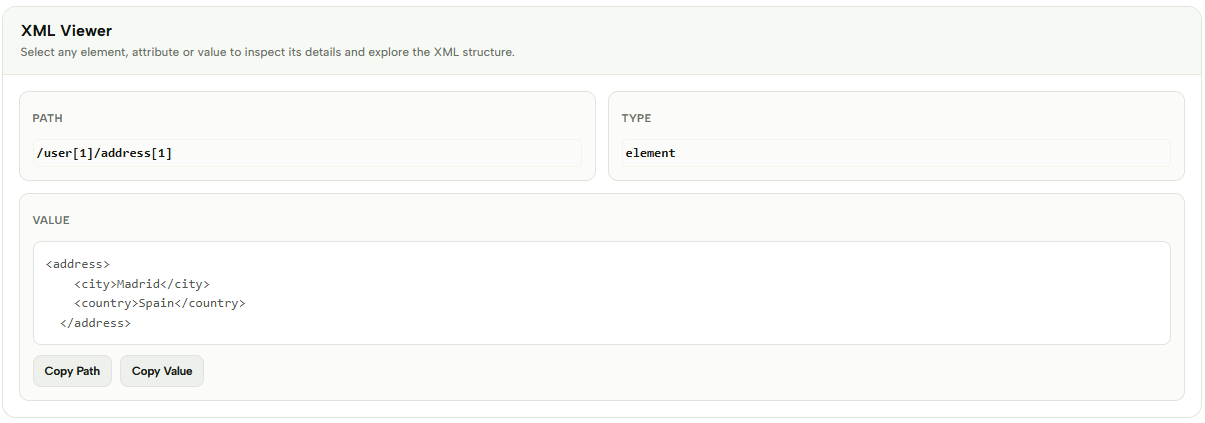
You can then expand the address element to inspect its nested values. Selecting an element displays additional information about its structure, making it easier to understand where a value is located within the XML document.
Check the example image below to see how the XML structure and selected element information are displayed. ↓
XML Viewer is useful for inspecting configuration files, API responses, application data, and other XML documents. Instead of working with a long block of XML code, the interactive structure makes it easier to locate specific elements and understand how the document is organized.
The tool also makes it easier to work with large XML files by allowing you to focus on specific sections of the document. You can quickly navigate through nested elements and inspect individual values without having to manually search through the entire XML.
Everything is processed directly in your browser, making XML Viewer convenient for developers and anyone who needs to inspect XML data quickly without installing additional software.
More XML Tools
If you work with XML regularly, CodeLiqo also provides other XML tools for viewing, validating, formatting, testing and converting XML documents:

XML Compare
Compare two XML files and find differences instantly.

XML Validator
Validate XML syntax and find errors instantly.

XML Formatter
Format and beautify XML for easier reading and editing.

Xpath Tester
Test XPath expressions against XML documents quickly.

XML to CSV
Convert XML data into a structured CSV format.

XML to JSON
Convert XML data into a structured JSON format.
XML to PDF
Convert XML data into a PDF document instantly.

XML to TXT
Convert XML data into clean and readable plain text.

XML to HTML
Convert XML data into structured HTML content.

XML to XLSX
Convert XML data into an Excel spreadsheet instantly.
XML to TSV
Convert XML data into a structured TSV format.

XML to YAML
Convert XML data into clean and readable YAML.