JSON Validator
Validate JSON instantly and identify syntax errors directly in your browser
EVERYTHING YOU NEED TO KNOW
How to use the JSON Validator?
A JSON Validator checks whether a JSON document follows the correct JSON syntax and structure. It detects syntax errors such as missing commas, incorrect quotation marks, unmatched brackets, invalid values, or improperly formatted strings, helping you identify problems before using the JSON in an application or API.
Simply paste or type your JSON into the validator and run the validation. The tool analyzes your input and checks whether it follows the JSON syntax rules. If an error is detected, you can use the information provided to locate the problem, correct it, and validate your JSON again.
Common JSON syntax errors include missing or extra commas, mismatched brackets, missing quotation marks, unquoted property names, trailing commas, and invalid values. Because JSON follows strict syntax rules, even a small mistake can make an entire JSON document invalid.
If your JSON contains a syntax error, the validator identifies the input as invalid and provides information about the problem. Check the indicated location, correct the syntax, and run the validation again. Once all syntax errors have been fixed, the validator will confirm that your JSON is valid.
No. CodeLiqo’s JSON Validator processes your input directly in your browser. Your JSON does not need to be uploaded to a remote server for validation, allowing you to check your data while keeping the content on your device.
What Does JSON Validator Do?
JSON Validator checks whether a JSON document is correctly formatted and identifies syntax errors that may prevent it from being parsed. You can add your JSON by pasting the text directly into the input field or by selecting a .json file from your device.
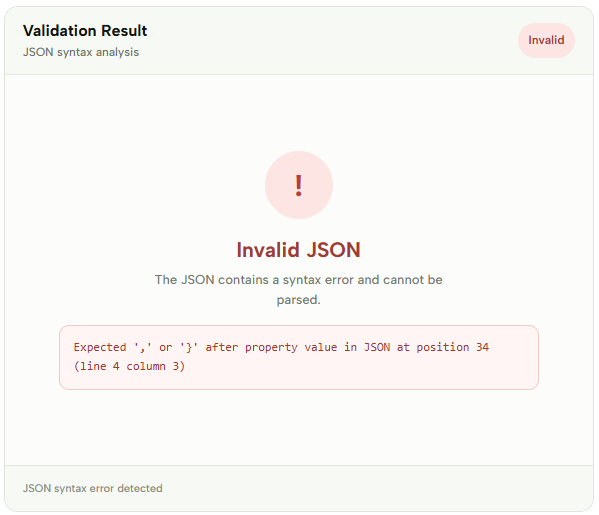
After adding your JSON, click Validate JSON to check the document. If the JSON is valid, the Validation Result section confirms that the document is valid. If an error is found, the tool displays the specific syntax error and its location, making it easier to find and fix the problem.
For example, a invalid JSON document could look like this:
{
  "name": "John",
  "age": 30
  "active": true
}
If the document contains a syntax error, such as a missing comma or bracket, the validation result identifies the problem so you can correct the JSON.
Check the example image below to see how JSON Validator displays a specific syntax error. ↓
JSON Validator is useful when working with API data, configuration files or JSON documents before using them in an application or another tool. Validating the structure first can help you detect formatting problems before they cause errors elsewhere.
More JSON Tools
Need to work with JSON in other ways? Explore our other JSON tools to format, validate, view, convert and analyze your data.
JSON Compare
Compare two JSON files and find differences instantly.

JSON Viewer
View and explore JSON data in a clear, structured format.

JSON Formatter
Format and beautify JSON for easier reading and editing.
JSON to CSV
Convert JSON data into a structured CSV format.
JSON to XML
Convert JSON data into a structured XML format.
JSON to XLSX
Convert JSON data into an Excel spreadsheet instantly.
JSON to SQL
Convert JSON data into SQL statements for databases.

JSON to YAML
Convert JSON data into clean and readable YAML.

JSON to TSV
Convert JSON data into a structured TSV format.