JWT Inspector
Inspect JSON Web Tokens, analyze their claims, expiration, timestamps and header information directly in your browser
EVERYTHING YOU NEED TO KNOW
How to use the JWT Inspector?
A JWT Inspector allows you to examine the structure and contents of a JSON Web Token. It separates the token into its header, payload, and signature components for easier inspection.
Simply paste your JWT into the inspector and start the inspection. The tool decodes the readable parts of the token and displays its contents in a clear and structured format.
A JWT contains a header, a payload, and a signature. The header describes the token, while the payload contains claims and other information included in the token.
Yes. You can inspect an expired JWT to view its structure and payload. However, an expired token may no longer be accepted by the application or API that issued it.
No. CodeLiqo’s JWT Inspector processes your token directly in your browser. Your JWT does not need to be uploaded to a remote server for inspection, helping keep your data on your device.
What Does JWT Inspector Do?
JWT Inspector lets you inspect a JSON Web Token and view its main components and information in a clear, structured format. After adding a JWT, the tool analyzes the token and displays details about its algorithm, token type, claims and expiration status.
The inspection includes the Header, Payload and Signature separately. The Header shows information such as the signing algorithm and token type, while the Payload displays the claims contained in the token, including values such as the issuer, subject, audience, issued-at time, expiration and JWT ID when they are present.
For example, you can inspect this JWT:
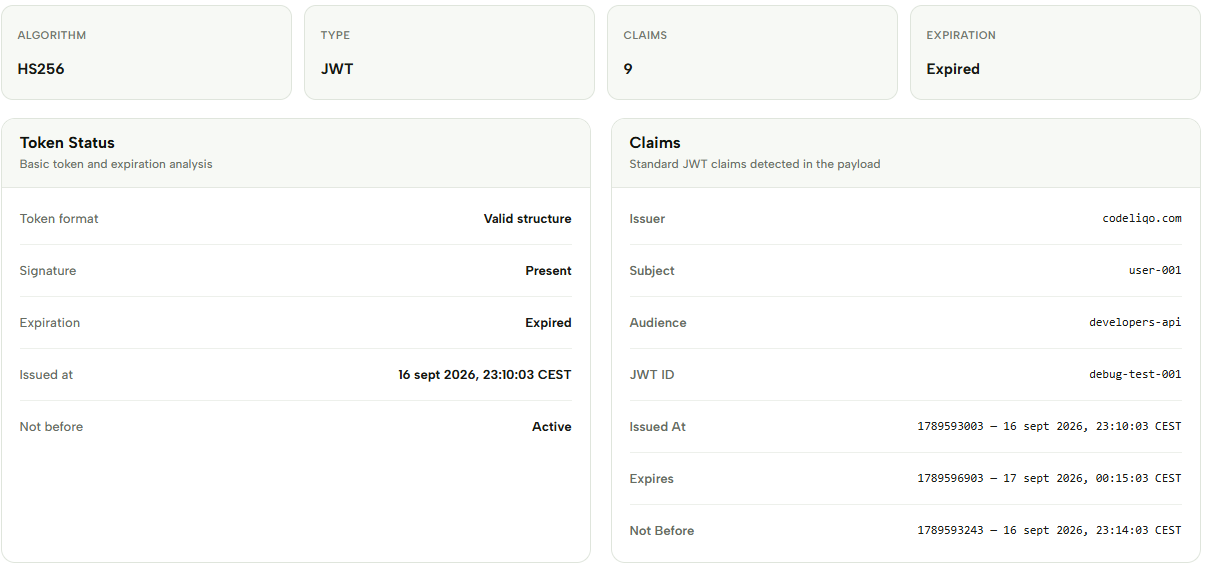
eyJhbGciOiJIUzI1NiIsInR5cCI6IkpXVCJ9.eyJzdWIiOiJ1c2VyLTAwMSIsImlzcyI6ImNvZGVsaXFvLmNvbSIsImF1ZCI6ImRldmVsb3BlcnMtYXBpIiwibmFtZSI6IkFsaWNlIEpvaG5zb24iLCJyb2xlIjoiZGV2ZWxvcGVyIiwiaWF0IjoxNzg5NTkzMDAzLCJuYmYiOjE3ODk1OTMyNDMsImV4cCI6MTc4OTU5NjkwMywianRpIjoiZGVidWctdGVzdC0wMDEifQ.xDc3rPJoD_6MF64MW8ijdIyQWg2NtbqUhSm2OhSRFZgCheck the example image below to see the information displayed by JWT Inspector. ↓
The results make it easier to understand the contents of a token and check important information such as its expiration time and standard claims. JWT Inspector is useful when debugging authentication tokens, examining API requests or checking the contents of a JWT during development.
The Token Status section provides a quick overview of the token, including whether its structure is valid, whether a signature is present and whether the token is expired. The Claims section organizes the detected claims so that important values can be reviewed without manually decoding the token.
The Header, Payload and Signature are also displayed separately. This makes it easier to inspect each part of the JWT and understand how the token is structured. You can copy the displayed Header, Payload or Signature when you need to use the information elsewhere.
JWT Inspector is designed for inspecting token contents directly in your browser. It can be useful during development and debugging when you need to understand what information a JWT contains or investigate an authentication-related issue.
More JWT Tools
Need to work with JWTs in other ways? Explore our other JWT tools to decode, encode, generate, validate and debug tokens.